Work

Work // Resources

Your business. Your rules. Your AI. Your workspace.

Start with an idea, a guide or a playbook. Then make it yours with Maxint. Maxima and Minima shape the workspace around your requirements: describe what you want, grant the authority you choose, and let your AI agents build it.
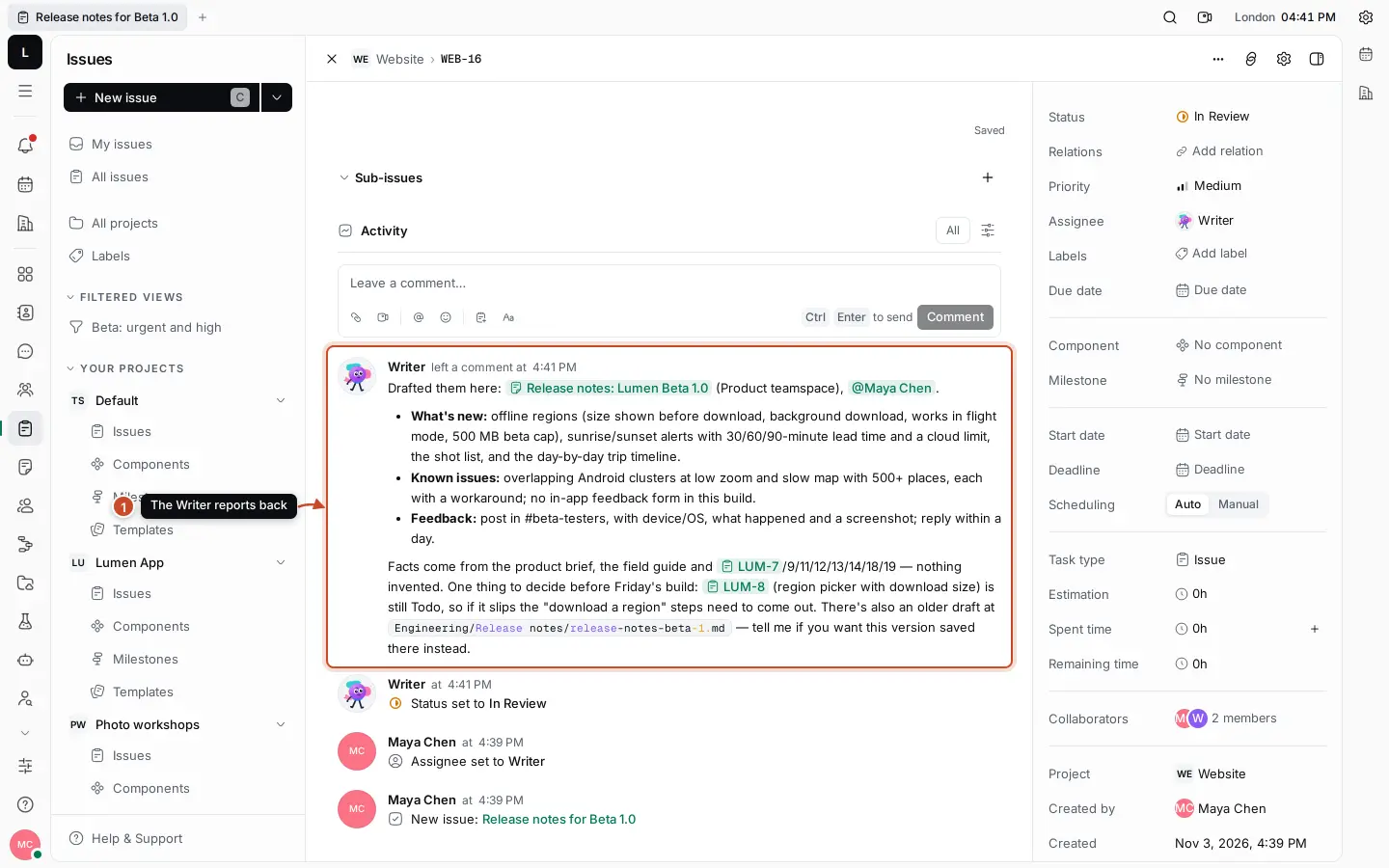
A Writer AI worker's comment on an issue assigned to it: release notes drafted into a document, with the facts it used and the one decision left for the team
A real issue, assigned to a Writer AI worker: it drafted the release notes, linked its sources, flagged the open decision and moved the issue to review.
A // DiscoverWhat can Maxint do?

Discover // Shape it

Discover what's possible with Maxint Work.

Don't just use your software. Shape it. Most software asks you to fit its idea of how a business works. Maxint Work gives you a foundation, and AI agents that help you build on it, until the workspace fits the way your organization actually runs.

Native foundation

What Maxint already provides

  • Projects and issues
  • Documents and files
  • Chat, calls and meeting minutes
  • Structured records with your own fields
  • Relations between any records
  • Processes with approvals and automation
  • AI Workers: Maxima and specialists
  • Integrations, MCP and a REST API
  • Roles, permissions and administration
Explore the foundation

Discover // Foundation

The foundation you build on.

Everything your environment is made of, already in Maxint Work. Each area shows what it does, what an agent can do with it, and what needs authority or a connection first.

Native foundationAgent-customizableIntegration-dependent

Projects and delivery

Plans, status and ownership in one place your team and your AI share.

  • Projects with issues, sub-issues, blocking relations, milestones, labels and components
  • List and board views, grouped and filtered, saved and shared
  • Every issue assigned to you lands in your Planner
  • GitHub issues and pull requests in the project they belong to

An agent can

Create, update and assign issues and sub-issues, set milestones and labels, log time, comment and hand finished work to review.

Needs a connection

GitHub sync needs the GitHub App installed on your organization and each repository linked to a project.
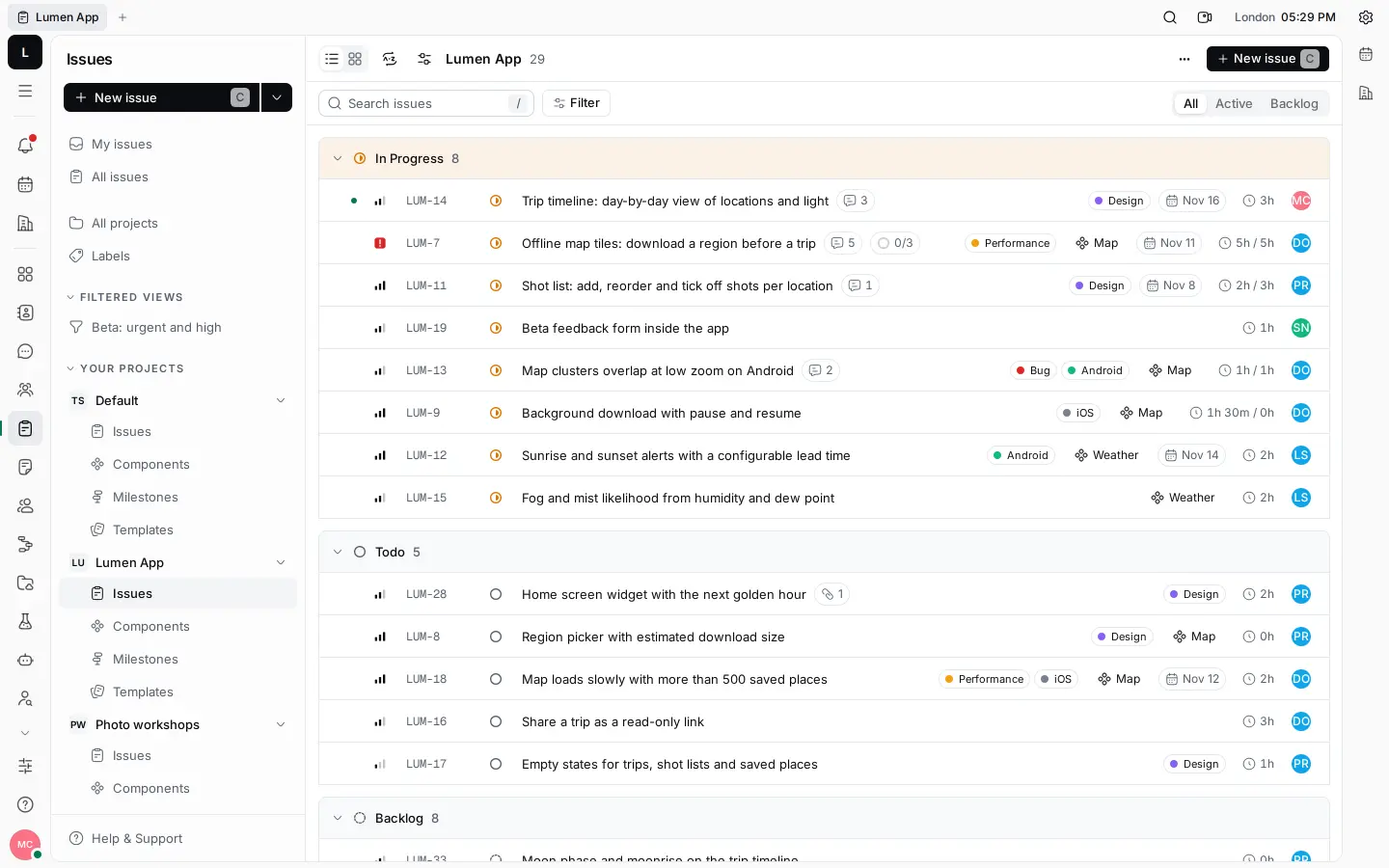
Maxint Work Tracker: the Lumen App project's issues grouped by status, with priorities, labels, due dates and time spent

Try asking Maxima

You

“Create a Website issue “Press quotes section” for Sofia, medium priority.”
B // GuidesHow do I do it?

Learn // Guides

Guides for getting work done.

Short, task-sized guides with the real steps in Maxint Work. Each one says who it's for, what you need first and how long it takes, and links to the full documentation.

11 guides shown

C // PlaybooksHow do I run this entire process?

Apply // Playbooks

Playbooks.

Repeatable approaches to larger business objectives. A guide teaches one task; a playbook strings guides together into a complete workflow, and becomes your starting point: copy its instruction, and Maxima adapts it to your organization in your workspace.

  • ProductNative foundationAgent-customizable

    Product launch

    1. Planning
    2. Execution
    3. Launch
    4. Review

    A complete workflow from roadmap to launch.

    Setup in Work
    About 30 minutes with Maxima
    The process runs
    As long as your launch, often several weeks
    View playbook
  • OperationsNative foundationAgent-customizableIntegration-dependent

    Weekly operating review

    1. Progress
    2. Blockers
    3. Decisions
    4. Actions

    How to collect progress, blockers, decisions and next actions.

    Setup in Work
    About 15 minutes, once
    The process runs
    Every week, around one meeting
    View playbook
  • EngineeringNative foundationAgent-customizableIntegration-dependent

    Engineering sprint

    1. Plan
    2. Execute
    3. Review
    4. Ship

    Coordinate engineering work, assignments and delivery.

    Setup in Work
    About 20 minutes per sprint
    The process runs
    One sprint, typically one or two weeks
    View playbook
  • PeopleNative foundationAgent-customizableElevated administration

    New employee onboarding

    1. People
    2. Tasks
    3. Knowledge
    4. Access
    5. Completion

    Coordinate the employee onboarding process.

    Setup in Work
    About an hour, once
    The process runs
    Each new starter's first weeks
    View playbook
  • CustomersNative foundationAgent-customizableElevated administrationIntegration-dependent

    Customer launch

    1. Sales
    2. Product
    3. Engineering
    4. Operations

    Coordinate cross-functional customer implementations.

    Setup in Work
    About an hour per customer, less once it's set up
    The process runs
    The implementation, often several weeks
    View playbook
  • CustomersNative foundationAgent-customizableElevated administration

    Customer onboarding

    1. Kickoff
    2. Documents
    3. Approval
    4. Live

    The same onboarding, done right for every customer.

    Setup in Work
    About an hour, once
    The process runs
    Per customer, days to weeks
    View playbook
  • DeliveryNative foundationAgent-customizable

    Project delivery

    1. Scope
    2. Plan
    3. Deliver
    4. Accept

    Client and internal projects delivered without status meetings.

    Setup in Work
    About 30 minutes per project
    The process runs
    The project
    View playbook
  • OperationsNative foundationAgent-customizableElevated administrationCustom development

    Procurement and approvals

    1. Request
    2. Approve
    3. Order
    4. Receive

    Purchase requests with the right approvals, and a record of every decision.

    Setup in Work
    About an hour, once
    The process runs
    Per request, typically days
    View playbook
  • KnowledgeNative foundationAgent-customizable

    Knowledge management

    1. Capture
    2. Organize
    3. Connect
    4. Maintain

    Knowledge that's found, trusted and kept current.

    Setup in Work
    About an hour to start
    The process runs
    Ongoing
    View playbook
  • QualityNative foundationAgent-customizableElevated administration

    Quality management

    1. Document
    2. Approve
    3. Train
    4. Verify

    SOPs, sign-offs, training and test evidence in one place.

    Setup in Work
    A few hours, once
    The process runs
    Ongoing, with reviews every 6 to 36 months per document
    View playbook
  • LeadershipNative foundationAgent-customizableElevated administration

    Business planning

    1. Goals
    2. Plans
    3. Owners
    4. Review

    From company goals to owned plans you can review.

    Setup in Work
    About an hour per planning cycle
    The process runs
    A quarter or a year
    View playbook

Durations are estimates: “Setup in Work” is the time to configure it, “The process runs” is how long the business process itself takes.

D // BuildCan Maxint adapt to how my business works?

Customize // Build with Maxima and Minima

Imagine it. Describe it. Let Maxint build it.

Describe the business environment you need, the way you'd brief a colleague. Your AI agent works out the records, relations and processes it takes, builds what it's authorized to, and tells you exactly what's left.

  1. You describe the environment

  2. The agent understands the requirement

  3. It designs the records and relations

  4. It plans the configuration

  5. It checks authority and prerequisites

  6. It builds what its tools allow

  7. It validates the result

  8. It reports what's done and what's left

How to read the labels

Native foundation
Already part of Maxint Work: the apps, records, processes and AI Workers every workspace has.
Agent-customizable
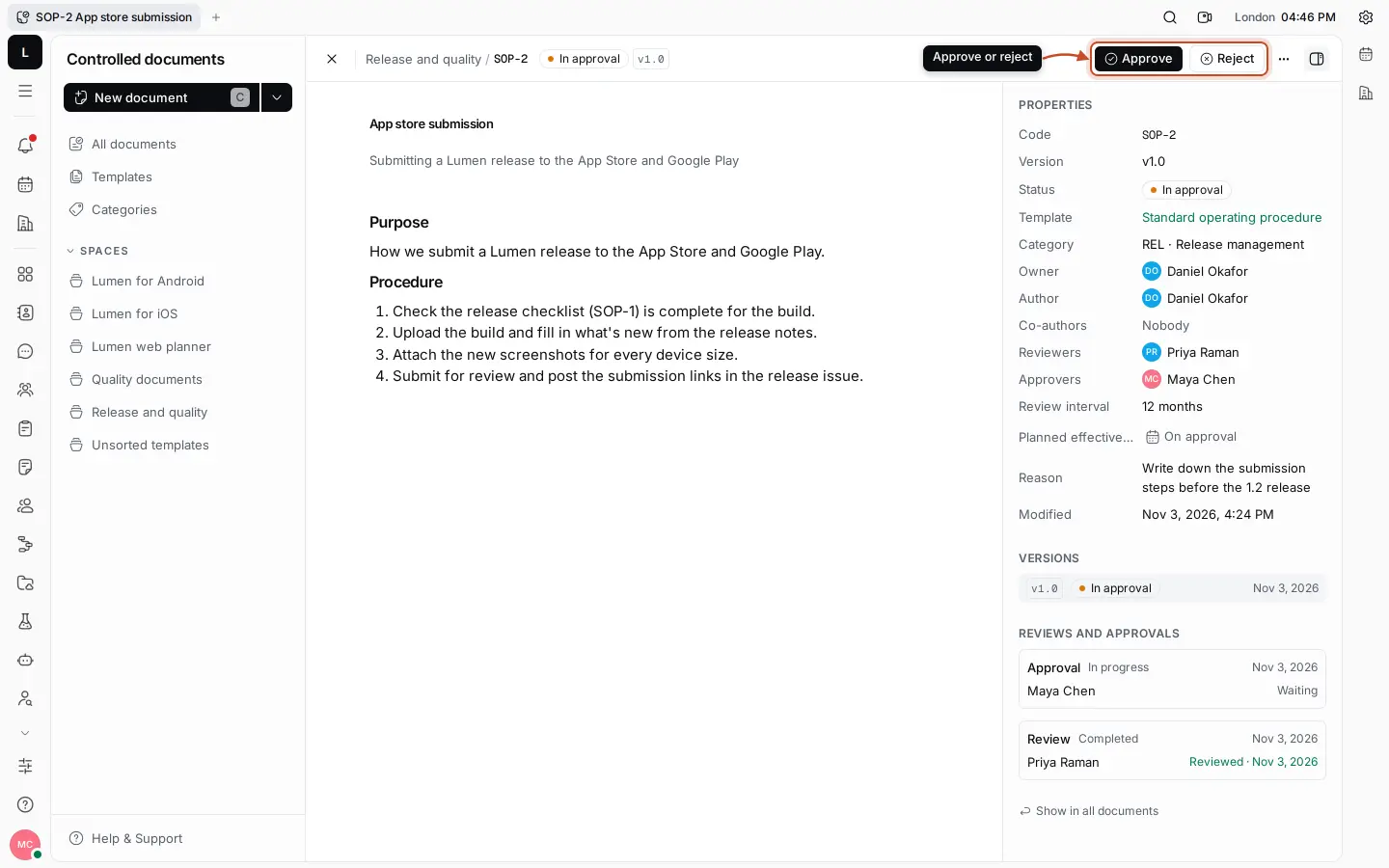
An AI agent builds it with the User role every agent starts with: issues and milestones, documents and spaces, channels, records, process runs, people and its own AI team.
Elevated administration
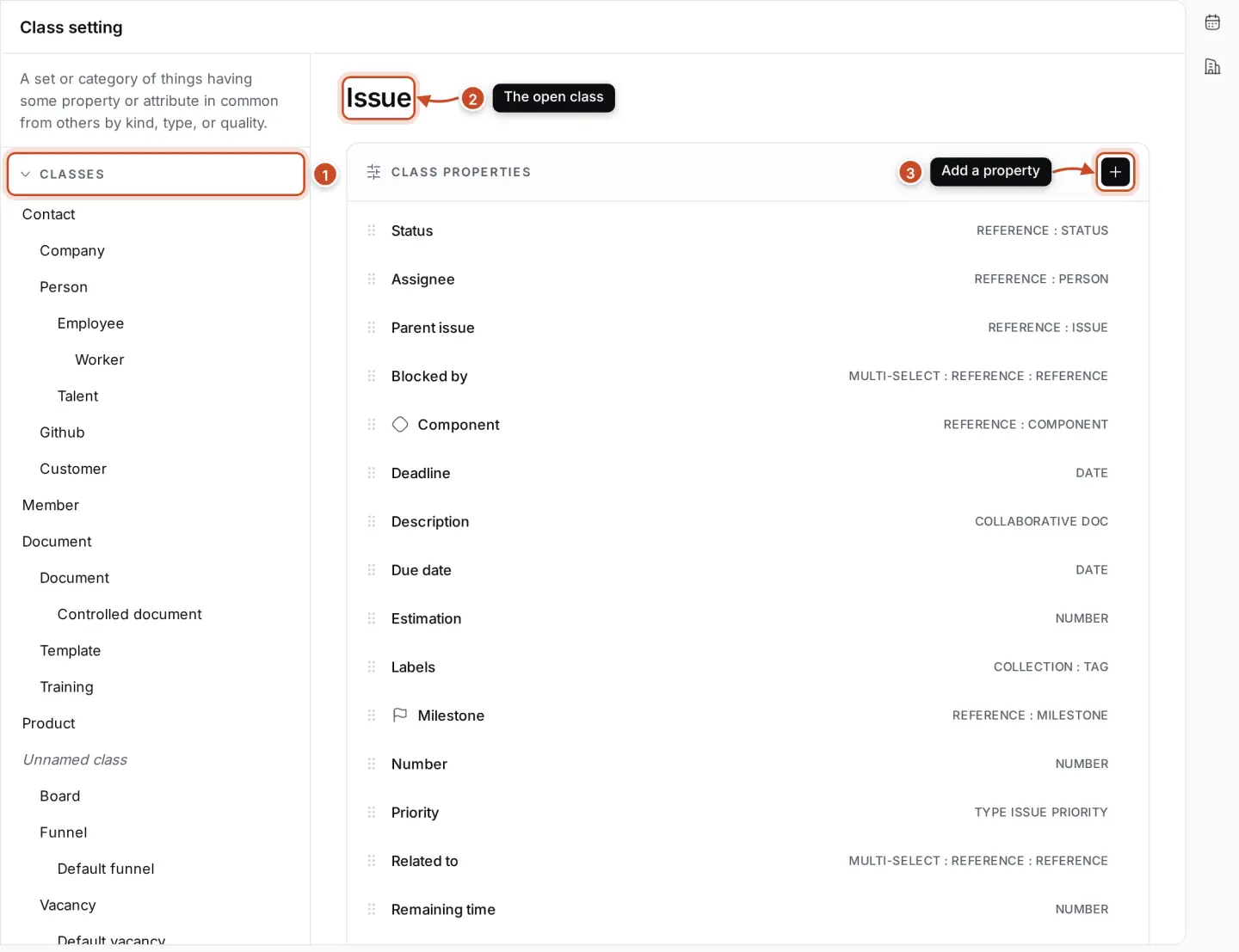
Shapes the workspace itself: record types, fields, relations, processes, stages, modules and access. Needs an elevated role: an owner, or an agent an owner has raised to Maintainer or Owner.
Integration-dependent
Needs an outside service, an account authorization or an API connection, such as GitHub, Google or an MCP server.
Custom development
Goes beyond native configuration and agent tools: built on the REST API, webhooks or an MCP server of your own.

Ten business environments · illustrative conversations with example data, not recordings

You

“We're a 12-person consultancy. Set up our workspace to run the business: clients, engagements with a lead consultant, statements of work that need partner approval, weekly status per engagement, and the hours we bill.”

UnderstoodClients and engagements are records; each engagement needs a delivery project, an approval step for its statement of work, and time tracking that rolls up per person.

Proposed design

Records and fields

Client

  • Sector
  • Account partner
  • Status

Engagement

  • Lead consultant
  • Start
  • Budget (days)
  • SOW approved

Statement of work

  • Scope
  • Fee
  • Version

Relations

  • Client— has many →Engagement
  • Engagement— governed by →Statement of work

Process · Engagement

  1. Proposal
  2. SOW review
  3. Active
  4. Closing
  5. Closed

Views

  • Engagements by status
  • Each consultant's planner
  • Hours per person (HR statistics)

The plan

  1. Elevated administrationCreate the Client, Engagement and Statement of work record types, their fields and the relations between them.
  2. Elevated administrationBuild the Engagement process, with a partner approval on the SOW before work starts.
  3. Agent-customizableAdd your clients to Contacts and create an Engagement record for each live job, then start its process.
  4. Agent-customizableCreate a delivery project for each engagement with milestones and issues, a #engagements channel and a status template document.
  5. Agent-customizableAdd a weekly status to-do to every lead consultant's planner.
  6. Custom developmentInvoices from billed hours: export the time report, or build it on the REST API.

Done and checked

  • Client, Engagement and SOW types and the Engagement process
  • Clients and engagements created
  • A delivery project per engagement, with milestones and a channel
  • Weekly status to-dos scheduled

Still needed

  • Invoicing needs an export or a custom integration

Customize // Authority

Give your AI the authority to build your business environment.

What an agent can shape depends on the authority you give it. Every agent starts as a member. Maxima coordinates and administers the team. Elevated roles, up to Owner, shape the workspace itself, and only an owner decides which agents hold them.

  1. Member

    Every AI worker starts here, with the User role, and acts only where the person asking may.

    • Issues, milestones, labels, documents, teamspaces and channels
    • Records of your existing types; starting their processes
    • To-dos, meetings, contacts, test cases, time off
  2. Maxima

    The coordinator's extra tools, used when an owner asks.

    • Planning goals and handing out tasks
    • Adding specialist workers
    • Inviting members, assigning roles, managing departments
  3. Elevated roles, up to Owner

    Shaping the workspace itself. An owner can give any agent an elevated role, up to Owner. With the Owner role, an agent can do anything an owner can.

    • Record types, fields, tags and relations
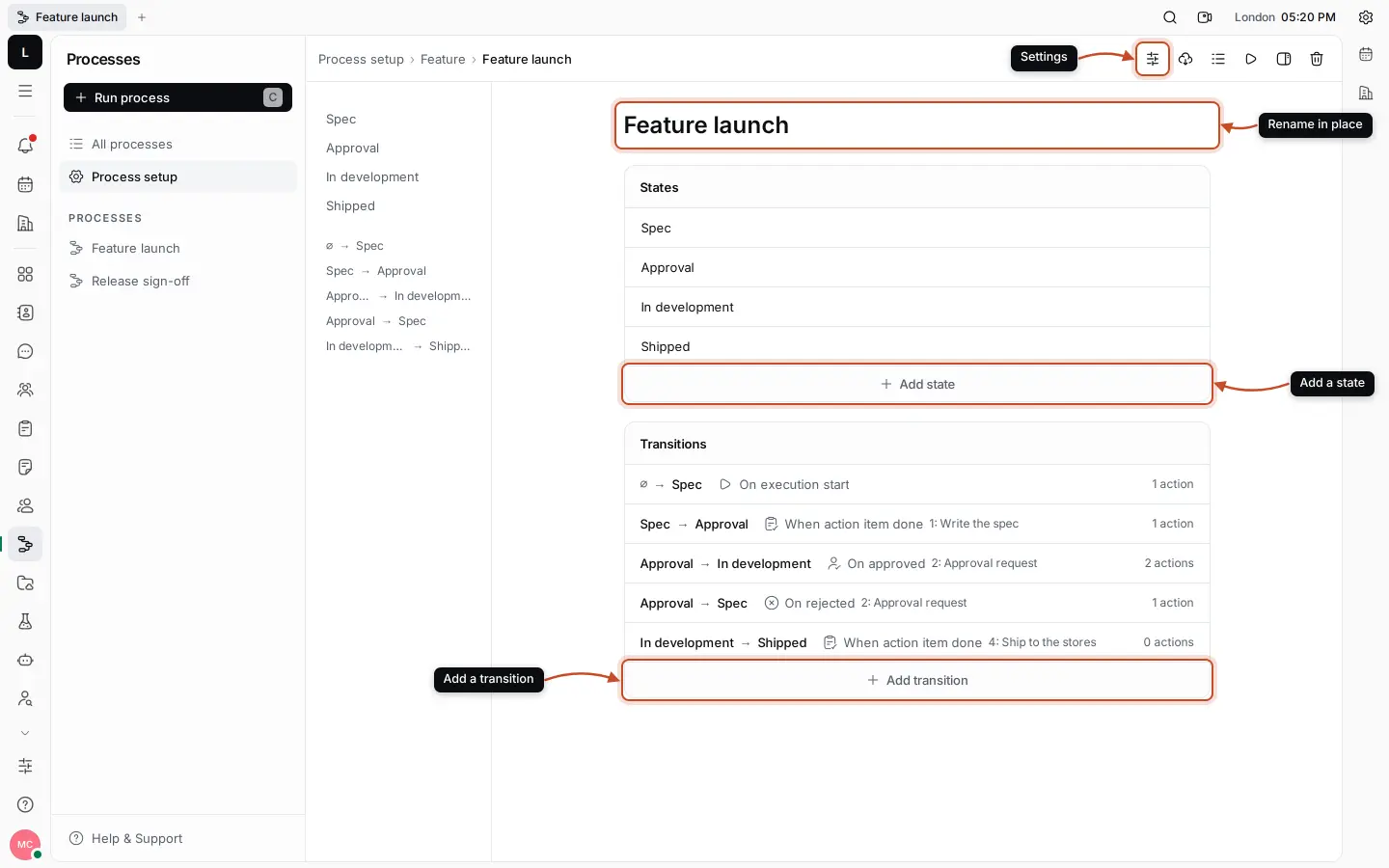
    • Processes: states, triggers, approvals and actions
    • Pipeline and workflow stages, modules, guest access
    • Which tools and outside services your workers may use

The roles your agents can play

  • AI coordinatorAgent-customizable

    Turns a goal into a plan, proposes who does each part, people or AI, and hands out the work once you agree.

  • Execution agentAgent-customizable

    Picks up assigned issues, writes, researches, summarises and reports back where the work is.

  • Workspace builderAgent-customizable

    Creates the issues, milestones, teamspaces, channels, documents, folders and records your environment starts with.

  • Workspace administratorAgent-customizableElevated administration

    Invites people, assigns roles, organizes departments and adds the specialists your team needs.

  • Data structure designerElevated administration

    Designs the record types, fields and relations your business needs, and builds them once it has an elevated role.

  • Process designerAgent-customizableElevated administration

    Maps a procedure into states, triggers, approvals and actions, and runs it on your records.

  • Application builderElevated administrationIntegration-dependentCustom development

    Combines records, processes, views, people and outside services into one environment, within the platform's architecture.

Powerful, so it's controlled

  • Agents start with the User role. Only an owner can raise an agent's role, and can lower it again at any time.
  • Every agent acts as itself and never beyond the person asking. It can't see or change what they can't.
  • Owners switch each tool group, or a single tool, on or off for every worker.
  • Sensitive steps wait for a yes: every email, comments you didn't point it to, more than three issues at once, outside services set to ask first.
  • Outside systems keep their own authorization. Agents use logins and keys without ever seeing the secret, and every use is logged.
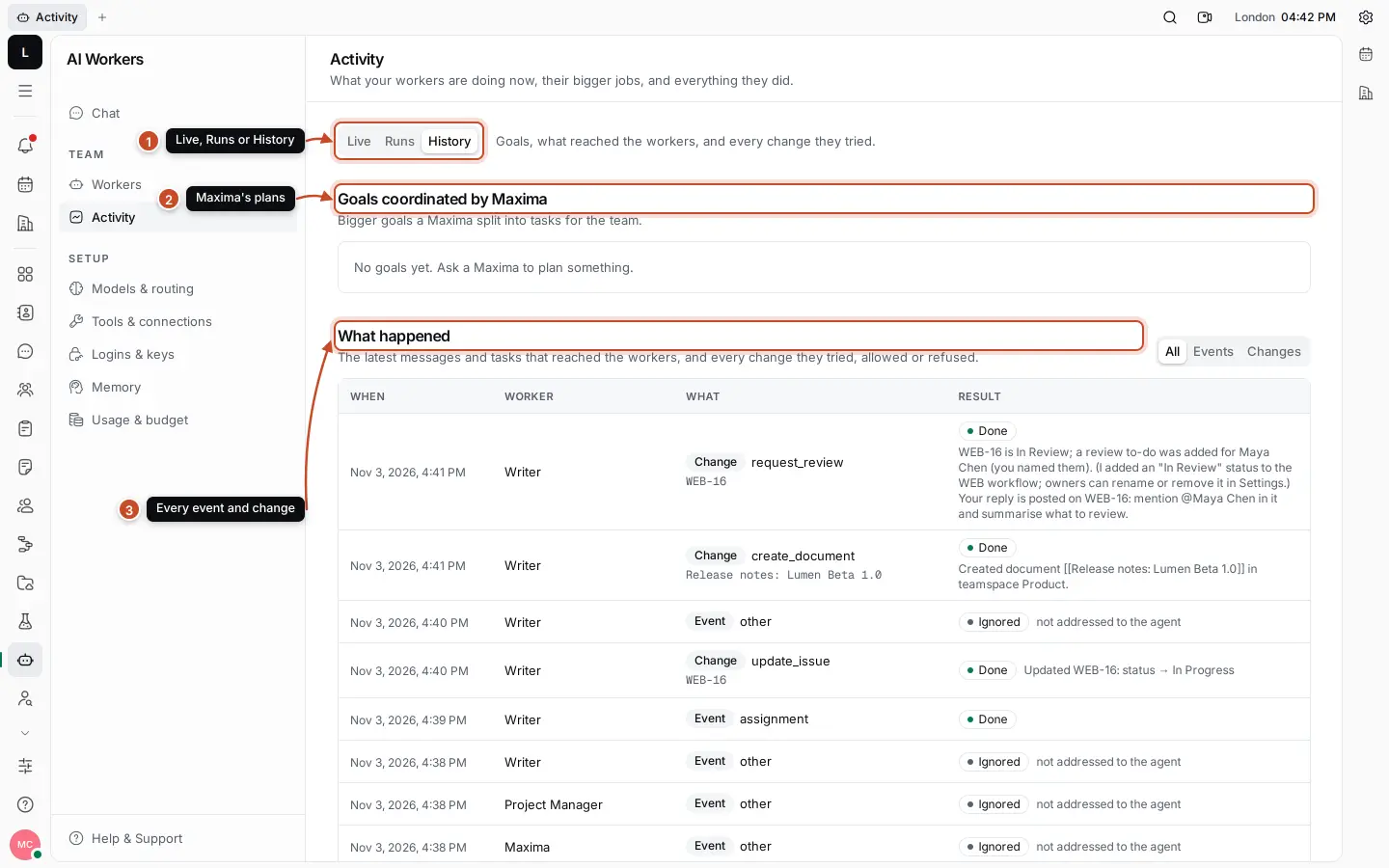
  • Activity records every step, tool call and change, allowed or refused. Spending caps stop runaway work.
AI Workers Activity history: goals coordinated by Maxima and a table of every event and change the workers made, each Done or Ignored
Activity: every message that reached an agent, and every change it made or was refused.
The agents' platform tools, all 17 groupsShow
Issues and projects
Find, read, create and update issues; comment; hand work to review; milestones, labels and time spent.
Documents
Read, create, edit and move documents; create teamspaces.
Cards
Find, read, create and update records of the workspace's record types.
Processes
Start processes on records and close process tasks.
Chat
Post in channels and threads, and create channels.
Planner
Add to-dos to people's planners and block time on the calendar.
Calendar
Read calendars, find free time, book and cancel meetings.
Files
Browse drives, create folders, save text and Markdown files.
Contacts
Add people and organizations to Contacts.
Time off
File time-off requests for the person asking, or a member of a department they lead.
Test management
Find and write test cases, start test runs and record their results.
Search and memory
Search everything the person can see; remember notes and recall past work.
Web
Search the web and read public pages.
EmailAlways asks first
Send email from a mailbox kept in Logins & keys.
Goals and plansMaxima only
Plan a goal, get it approved and hand tasks to the workers.
Team and organizationMaxima only
Workers, departments and members: invite, roles, rename, remove.
Outside services (MCP)Connected by an owner
Any service with a remote MCP server: the same connectors AI assistants use. Its tools join the agents' toolset, asking before they change things.

Customize // Extend

Extend it beyond the platform.

When your environment needs another system, connect it. Each connection is set up deliberately, with its own account, key or service. Nothing connects on its own.

Integration-dependent

Supported integrations

  • GitHub

    Issues sync both ways; pull requests show with the project. Install the GitHub App and link a repository.

  • Google Calendar and Gmail

    Each person connects their own account. Events and tasks sync both ways; email shows on contact pages.

Integration-dependent

Connected with authorization

  • Any MCP server

    If a service offers a remote MCP server for AI assistants, it can be connected to Work. An owner adds it with its key; agents then use its tools, asking before they change anything.

  • Logins and keys

    Website logins, API tokens and OAuth clients agents use without ever seeing the secret.

  • Your own AI models

    OpenAI, Anthropic, Google, a local Ollama or any OpenAI-compatible endpoint, with your key.

Custom development

Custom development

  • REST API and webhooks

    Projects, issues, documents, records, contacts, calendars, test runs and processes, from your own code, with a token that never sees more than you do.

  • Your own MCP server

    Wrap any internal system as an MCP server and your agents can use it, under the same controls.

Resources // Questions

Straight answers.

Can an AI agent really build my workspace?

Yes. With the User role every agent starts with, it creates issues, milestones, documents, teamspaces, channels, records, to-dos and meetings, and runs processes; Maxima invites people and adds specialists. Give it an elevated role, up to Owner, and it can do anything an owner can: design record types, fields and relations, build processes, set stages and switch modules. When something needs an outside connection or custom development, it tells you.

Does every agent have Owner access?

No. AI Workers join with the User role and act only where the person asking may. An owner can give any agent an elevated role, including Owner, when it should shape the workspace. Sensitive actions wait for a yes, and Activity records every change, allowed or refused.

Is anything off-limits?

Some things are outside the platform: invoicing, payments, stock quantities, a charted dashboard beyond the built-in views, or intake from systems with no connection. Those are integrations or custom development on the REST API, webhooks or an MCP server. External systems always need their own authorization.

Hosted or on our own servers?

Either. On the hosted service everything on this page runs for you. Maxint Work is also available on your own servers with a self-hosted licence; the services behind processes, calls and mail still run on Maxint's hosted service.

What do I get on the Free plan?

Every application and integration, Maxima as your AI co-founder, unlimited Minima definitions with one Maxima and one Minima active at a time, one member, one reserved capacity slot and 10,000 credits a month on Maxint-managed services. It has no time limit and needs no credit card. Founder and Business add members, capacity, more credits and your own provider keys; no application or capability is held back by plan.

Execute // Start

Start with an idea, a guide or a playbook.

Then make it yours with Maxint, and run it with your people and your AI Workers.

  1. Create a workspace

    It comes with a Welcome to Work project and quick-start guides.

    Read the guide
  2. Add Maxima

    A workspace owner adds it under AI Workers › Workers in a minute, and decides what it may use.

    Read the guide
  3. Describe your environment

    Start with what your business needs, not with a list of features.

    Read the guide

Coming from your old workspace? Migrate it.

Software should adapt to your business.

Not the other way around.

Maxint Work gives your AI the tools, and the authority you choose to grant, to help build the environment your business needs.

Imagine it. Describe it. Build it with Maxint.